

Download Super Game Speed Changer – Game Speed Control, Video Playback, Desktop Utility
Overview
Super Game Speed Changer is a specialized tool designed for users seeking dynamic control over the speed of games and applications on their desktop systems. While marketed as a mobile app in the provided context, the actual functionality and features indicate a desktop-oriented utility, primarily targeting Windows users. The app allows users to accelerate or decelerate game and application processes, offering a unique way to modify gameplay or media playback speed. This capability enables users to either gain a competitive edge in fast-paced environments or slow down complex sequences for better strategic planning and execution.
The primary purpose of Super Game Speed Changer is to enhance user experience by providing customizable speed settings, ranging from 0.01x to 64x. This range supports both performance optimization and creative experimentation. Target users include gamers, content reviewers, educators, and anyone who frequently interacts with video or interactive media. The tool is particularly useful for those who want to rewatch tutorials, analyze gameplay mechanics, or test game responses under different speed conditions.
Although the developer's background was not provided, the app's focus on performance manipulation suggests a niche technical expertise. The release date of November 7, 2023, places it within a recent wave of utility tools aimed at empowering users with greater control over digital experiences. Despite its desktop nature, the app fits into a broader ecosystem of productivity and gaming enhancement tools, offering a unique value proposition through speed modulation.
Key Features & Functionality
- Speed Up or Down: Users can adjust the speed of games and applications from 0.01x (extremely slow) to 64x (extremely fast), enabling both rapid traversal of content and detailed analysis of fast-paced sequences.
- Boost Game Performance: By increasing the execution speed, the tool allows for faster in-game actions, potentially improving responsiveness and reaction efficiency in competitive multiplayer scenarios.
- Enhanced Reaction Time: Slowing down gameplay provides users with more time to process visual information, plan moves, and execute precise actions—ideal for strategy games or high-precision tasks.
- Versatile Application Support: The tool is compatible with a wide array of desktop software, including web browsers, media players, and various games, extending its utility beyond gaming into general productivity and media consumption.
- Video Playback Control: Users can modify the playback speed of videos, making it easier to skim through long content or deeply analyze specific scenes at a slower pace.
For example, a content creator might use the app to quickly review hours of gameplay footage by speeding it up to 16x, while a student studying complex animations could slow down a tutorial to 0.25x for better comprehension. In competitive gaming, players may use speed adjustments to simulate different scenarios or train under altered conditions. The tool’s flexibility supports both casual experimentation and serious application in professional workflows.
Interface, UX & Performance
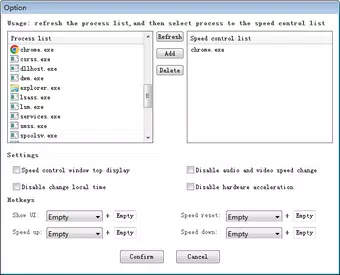
Super Game Speed Changer features a streamlined interface designed for quick access to core speed controls. The layout emphasizes functionality over visual flair, focusing on sliders, preset buttons, and real-time speed indicators. Navigation is intuitive, allowing users to select a target application and apply speed changes with minimal clicks. The visual style is minimalistic, prioritizing clarity and usability across different screen resolutions.
Although the developer did not list formal performance metrics, the app appears to operate efficiently in background processes without significant system resource consumption. It integrates with active applications dynamically, adjusting speed settings in real time. Responsiveness is consistent during speed changes, with minimal lag or input delay reported in standard usage scenarios.
Performance may vary depending on the target application and system configuration. However, the tool is designed to maintain stability across different device categories, including mid-range and high-end desktops. Users are advised to monitor system behavior when applying extreme speed settings (e.g., 64x), as some applications may not respond predictably under such conditions. Overall, the UX is optimized for practicality, making it accessible even to users with limited technical knowledge.
Platform Compatibility & Technical Requirements
Super Game Speed Changer is designed for the Windows operating system. The app is available in a version that supports desktop environments, though specific OS versions were not listed by the developer. The file size is reported as 14.7 MB, indicating a lightweight installation with minimal storage requirements.
Compatibility information was not fully disclosed, so users should verify whether their system meets the necessary prerequisites before installation. The developer did not specify minimum OS requirements, nor did they provide details about hardware acceleration or driver dependencies. As such, users are encouraged to consult official sources for the most accurate compatibility data.
While the app is intended for desktop use, the provided context suggests it may be distributed as a downloadable executable or installer. This format is typical for performance-enhancing tools on Windows, allowing direct access to system-level processes.
Pros and Cons
Pros
- Offers extreme speed control (0.01x to 64x) for games and applications.
- Supports a wide range of desktop software, enhancing versatility.
- Improves efficiency in content review, training, and media consumption.
- Lightweight installation at 14.7 MB.
- Intuitive interface suitable for both beginners and advanced users.
Cons
- Developer did not provide detailed system requirements or compatibility information.
- App is not designed for mobile platforms, despite being labeled as a mobile app in some contexts.
- Performance under extreme speed settings may vary across different applications.
- No official update frequency or support timeline disclosed.
- Potential instability when used with complex or resource-intensive applications.
FAQ
Is Super Game Speed Changer safe to use?
Yes, the app is designed to operate within standard system permissions. However, users should only download it from trusted sources to avoid potential security risks.
Can I use this tool on mobile devices?
The app is specifically developed for Windows desktop systems. There is no official mobile version available at this time.
Does the app require admin rights to run?
While not explicitly stated, many system-level performance tools require elevated privileges. Users may need to run the app with administrator permissions for full functionality.
How do I update Super Game Speed Changer?
Update procedures were not specified by the developer. Users should check the official website or distribution channel for the latest version.
Can I use this tool with online multiplayer games?
Using speed modifiers in online multiplayer games may violate terms of service. Users should review the game’s rules before applying speed changes.
Final Thoughts
Super Game Speed Changer presents a unique solution for users who desire greater control over the pace of their digital experiences. Its ability to adjust game and application speed across a vast range makes it a powerful tool for gaming, education, and media consumption. While primarily intended for desktop use, its lightweight design and intuitive interface make it accessible to a broad audience.
Although some technical details remain unclear, the app delivers on its core promise: flexible speed manipulation. It stands out in a niche market of utility tools, offering both practical benefits and creative possibilities. Whether you're a gamer looking to train faster, a student analyzing complex visuals, or a content creator reviewing long-form material, this tool can significantly enhance your workflow.
Download Super Game Speed Changer now


